Running Google Ads for Tradies

Are you a trade business looking for Google Ads management? Click here.

A specialised field

Trades such as plumbing and electrical services can be among the hardest campaigns to run profitably.

There are countless competitors all vying for space at the top of Google, everyone is shouting out free quotes and lowest prices and the cost per clicks are seemingly always rising.

Even experienced Google Ads managers have trouble making a high-converting and highly profitable campaign at the best of times, if they haven’t had a wealth of experienced dealing with your industry.

That’s where knowing a few extra tips and tricks can really come in handy.

Negative keywords

Negative keywords are an essential part of running a good Google Ads account as Google are pretty keen to match your keywords with anything closely related.

Believe it or not, Google will happily match your contracting/service keywords with terms related to DIY advice, tools, stores or supplies. That’s obviously not the type of search intent that we want to be paying for.

If you’re a tiler, for example, you will want to think about all the different pieces of equipment that you use on the job (and that other tilers/DIYers may be searching for) and make sure you’re not wasting money on those searches.

So, you’d add words into your negative keyword list such as:

  • Clips
  • Seats
  • Wedges
  • Cement
  • Scraper
  • Blade
  • Knife
  • Tools

Eliminating these terms from triggering your ads will greatly reduce the amount of wasted spend from the get-go and increase the likelihood of paying for traffic that is actually searching for trade services.

Every Bob, Dick and Harry

It’s another negative keyword tip, but one that is a very specific problem to tradies and one that may not be obvious when first setting up an account.

Often, when I’m looking through the search terms of plumbers, electricians, painters, carpet cleaners, antenna installers or any other trade-based client – a large amount of search terms that are being broadly matched with our keywords are “first name + surname plumbing”

That’s why it’s a good idea to get a negative keyword list together of all the most common names in the English language to get a head start on culling as many of these searches as possible.

Block Competitors’ Names

Whilst we’re blocking searches for other random tradesman, the next logical step would be to add other companies as negative keywords too.

The easiest way to get a list together, other than putting down the well-known players in the industry, is to just do a Google search. So, if you’re an electrician in the Perth metropolitan area you would search for “electricians Perth” to check out who is around.

Go ahead and add all those companies into your negative keywords (or compile a “Competitors” Negative Keyword List).

If we’re going tobid on competitors’ brand names , it’s best to do it in a more organised, targeted and measurable approach rather than just have them broadly matching with keywords like “plumber near me”.

Local Appeal

When people have problems around the home, they’re typically looking up the service plus their specific suburb with the hope that the service will be both quicker and cheaper using someone local.

Having separate AdGroups for each specific suburb that you wish to target along with matching ads that mention that targeted suburb will go a long way to set you apart from other ads that are using the same generic ads that they’d use for their non-geo or city area keywords.

Be Aggressive With Ads

You really want to make you competitive advantage known in your ads to increase the likelihood of getting relevant clicks to your website.

You’ll notice for this ad for Shutter Co WA that they’re the only roller shutter repair business who can claim to be there within one hour.

So, for a business owner who is trying to open up shop for the day and found that their roller shutters have been vandalised – it is clear who the most appealing option
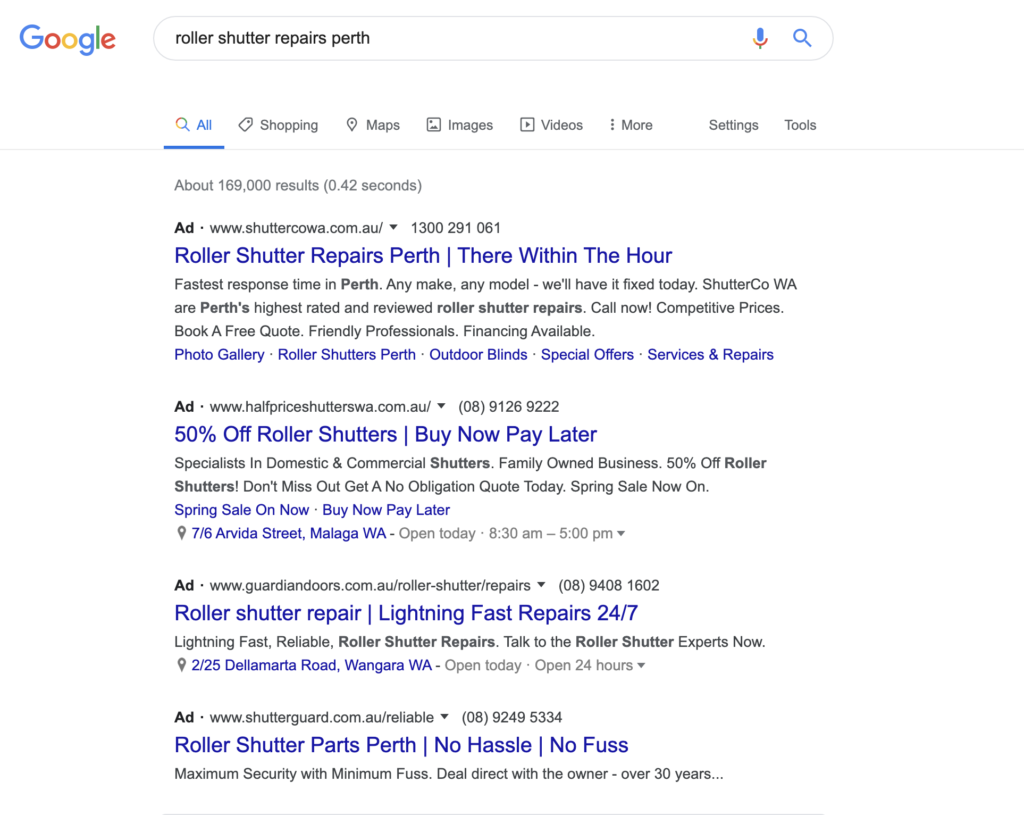
(You will also notice in this screenshot that some advertisers have not set their accounts up very well and are showing sales or parts ads for a repairs keyword).

It’s always about being relevant to the customer. Being qualified and with 20+ years of experience isn’t a strong competitive advantage when trying to immediately grab someone’s attention. They’re looking for tangible value such as price and convenience.

After Hours Campaigns + Call Only Ads

Instead of having one campaign that is going to serve all day long, why not separate them into regular hours and after-hours?

There’s a few good reasons to do this.

One is that you can write your ads differently depending on what time of day you’re targeting. If you’re advertising in regular hours, saying that you’re available 24/7 becomes irrelevant.

However, after-hours, saying that you’re available 24/7 and can be available within the hour is a great call to action.

You can also try utilising call-only ads during after-hours so that when the search user clicks the ad, it goes straight to a phone call instead of visiting your website. Normally, people like to see the website of the business that they’re contacting first but in a plumbing or electrical emergency, for example, people tend to be okay with such a direct approach.

With the increased profit margins of after-hours work, having a separate campaign allows you to bid at a higher cost per click than what you would during regular hours.

Having a website that converts

Running Google Ads can be unforgiving if you aren’t leading your traffic to a website that tells visitors what they need to know, and you make it easy for them to get in touch.

Take a look at the old Aaron’s Tree Lopping website below:
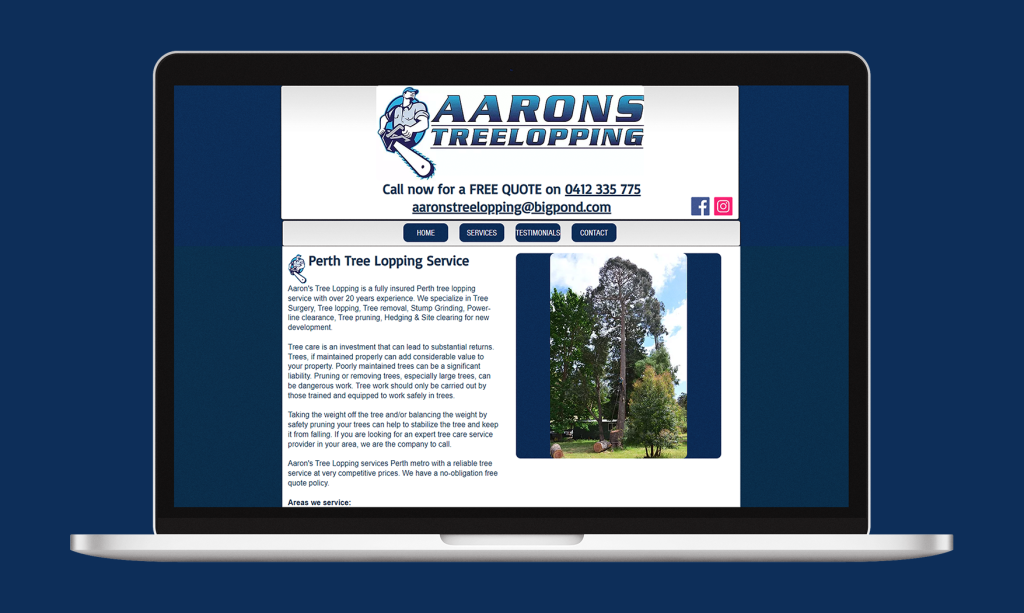
This website converted basically zero Google Ads traffic. We had to address this with a far more functional website, otherwise we were just going to throw money down the toilet.

Once we launched this new website, they started converting 30% of traffic.
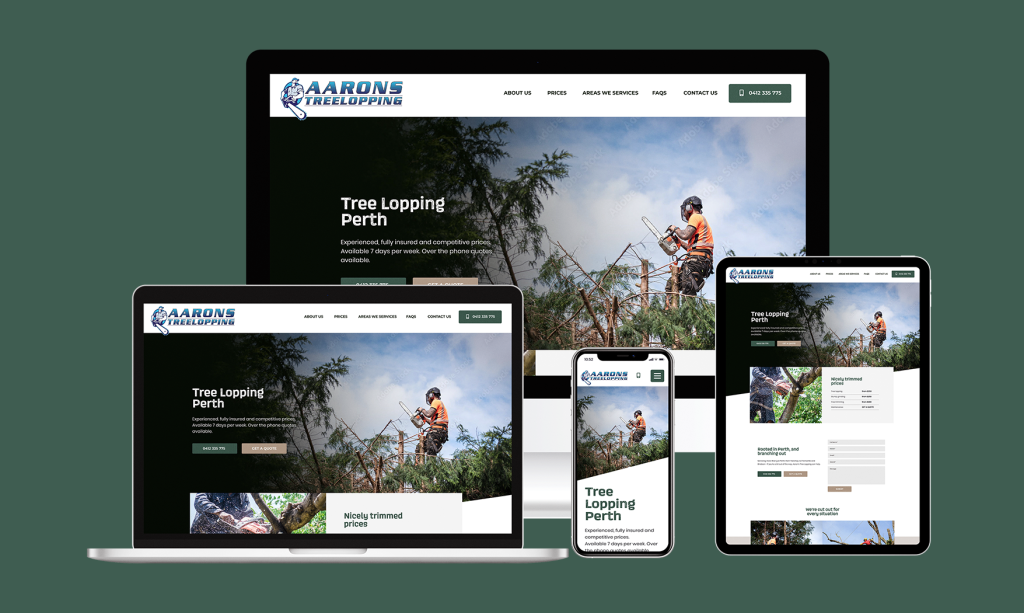
It’s easy to see why. Nicer imagery, easy to spot call and contact forms as well as clearly laid out prices. What more do customers need?

Tracking Is Vital

As with any good Google Ads campaign, making sure that you’re tracking every meaningful action is vital to knowing what is working in your account and how to further improve things.

This means:

  • Tracking phone calls to your business
  • Tracking contact forms filled
  • Tracking online bookings made (if applicable)

Google provides a free tracking number which will redirect any calls made to your normal phone number. When that tracking number is called, Google will credit that call to the keyword, ad, location, device and so much more.

If you really want to get deep into the call data, there are companies such as Avanser who offer call-recording which not only helps you to hear the quality of customers that your ads are generating, but if you’ve got someone else answering the phones it often offers great insights to where things may be dropping off in the sales process.

When I was working with a pest control company, through call tracking we found that the girls in the office who were answering the phones were just giving out prices on demand without explaining the many benefits of selecting them over their cheaper competitors.

This information resulted in additional training for the office staff which then ended up more than doubling the amount of calls that they were converting into booked jobs.

Prioritise Google Reviews

People are not only price conscious, but they also don’t want to waste money on a bad service.

So, more often than not, search users are doing their due-diligence and Googling your brand name (after finding you through a generic search) to see what others are saying about you.

Make sure that you increase the likelihood of people calling you by having a strong presence with your Google My Business listing.

Follow up text messages and emails are just a couple of ways you can encourage people to leave you more reviews on Google.

Finally; realistic expectations

First off, let’s talk about our expectations and how much things should cost.

Google Ads for tradies is expensive, yes. There are plenty of businesses that simply can’t make it work. Not because their web presence is poor, but because their customer retention is poor.

Tradies are paying anywhere between $40 to $100 per lead, depending on the industry and location that you’re in.

Now – if you don’t have a good strategy for customer retention and you typically only see a new customer once, then Google Ads will be unprofitable.

However, if you can turn a new job into a loyal customer, one who continually calls you back and also refers you onto family and friends; then Google Ads can be extremely profitable even at a high cost per lead.
How long does Google Ads take to work?

When investing in any marketing exercise, the idea is to make a return on investment.

And, ideally, the sooner the better.

But how long does it take to get that return on investment and what does it depend on?

The short answer is this: Google Ads can either work immediately, take some time, or not at all.

Whilst that’s not really the clear cut answer most are hoping for, let’s break down the scenarios where the same platform could deliver three very different outcomes.

Google Ads Can Work Immediately

Google Ads can work immediately providing that:

  • Your business is supplying a product/service that is relevant and competitive to your target market
  • You’re working with an adequate marketing budget to give the market enough exposure to your business
  • Know what you can pay for a lead, calculating the lifetime value your average customer
  • Your Google Ads account is being managed efficiently and attentively

We’ll go over these points in more detail below after we’ve run through the scenarios where Google Ads doesn’t work immediately.

Google Ads Can Take Time

However, the first month of Google Ads is always going to be the most inefficient.

So, if you’re seeing some results in your first month but not entirely happy – understand that a part of the process of optimising a Google Ads account is to collect data, refine the campaign and test those refinements.

You must also take into account the commitment requirements and purchase cycle of your product/service.

It is likely that someone searching for a local plumber may call you immediately after searching for a local plumber in Google and clicking on your website. However, it is highly unlikely that someone looking to purchase a renovate their home is going to commit to you the first time they land on your website, even if they’ve specifically searched for home renovations on Google.

Google Ads May Not Work For You

Depending on your business and the market that you serve, Google Ads may not be the right solution for your business.

This is most common in B2B (business to business) industries (such as accounting) where networking, relationship building, and referrals are vital to earning the kind of trust that isn’t typically earned just from landing on a website.

There is also the scenario where, due to such aggressive competition, the price of clicks on keywords relating to your business is simply too high to realistically compete.

Another challenge is when you’re competing with big companies.

For example, if you’re up against a big company that offers electrical, plumbing and HVAC, when they’re bidding on keywords, they’re typically able to bid a lot higher and subsequently pay more per lead due to the fact that they’re able to sell multiple services to that one lead – essentially cutting the cost per lead into thirds.

That makes it a lot harder for companies that offer just plumbing, just electrical or just HVAC services where they need to make profit off just one service per lead.

Or, Google Ads may not be the best way to access your target market.

Despite the rhetoric that old media such as radio and newspaper are dying, I simply couldn’t touch the results that those channels when I’ve run Google Ads for dentists or cruise companies, where the target audience is generally older.

Giving Yourself The Best Chance

In the first scenario, we listed four conditions that were conducive to a successful and explosive outcome Google Ads.

So, let’s dive a bit deeper into those four points and why they are so impactful on the performance of a Google Ads account.

1. Your Business

Two phrases come to mind here.

One of them is that “good products sell themselves”

And the other is “you can’t polish a t*rd”.

Or if we want to be a bit more sophisticated in our marketing speak – there are 4 P’s to a successful business:

  • Product
  • Price
  • Placement
  • Promotion

Notice how only one of those 4 P’s are to do with advertising (Promotion).

That means that what you sell, where you sell it and how much you sell it for contributes to 75% of a successful pitch to market with only 25% of it being down to marketing.

This may sound like us Google Ads professionals voiding ourselves of responsibility but after personally running over 300 Google Ads accounts so far in my career – the correlation is clear.

Good products sell themselves.

And you can’t polish a t*rd.

Be honest with yourself and how appealing your product/service is to the market compared to what your competitors are offering.

2. Adequate Budget

Whilst you can start running Google Ads on a fairly modest budget, some business owners underestimate what a reasonable starting budget is.

When Google Ads (formerly known as Google AdWords) first launched in October 2000, and for a few years after that; the cost per click was so cheap (we’re talking cents) that you could run a wildly successful campaign on just a few dollars per day.

But because the clicks in Google Ads works on a bidding system (whatever people are prepared to pay for a click), and more than just a few businesses have caught on since then – you need to have a serious budget when it comes to getting enough exposure on the platform.

If you’re a roofing contractor and your clicks cost around $4 per click and you only have a budget of $10 per day, you’re only going to 2-3 clicks per day.

Having only 2 visitors to your website per day and expecting the phone to ring off the hook is not realistic even with a well-optimised Ads account.

So, lifting that budget up to $20 per day (allowing 5 visitors per day) or $30 per day (allowing 7-8 visitors per day) is going greatly increase the odds of getting some enquiries through the website each day.

3. Realistic Goals

Knowing what you’re willing to pay for a lead is vital to establishing realistic goals in Google Ads.

When setting these realistic goals, you have to take into account the purchase cycle of a product/service and the lifetime value of that customer.

When Mindful Homes (a boutique home builder in Perth) started Google Ads with me, the only thing we could see in the Conversions column of the account for the first couple of months was tumbleweeds.  However, each month after that, the amount of leads that we were generating was growing aggressively. We just needed to be patient and understand that it can take a while to go from consideration to action with such a high-involvement purchase decision.

You may not be in an industry where there is such a high-involvement in your customers’ purchase decision, yet the cost to acquire that client more or less destroys the profit you make in that initial job – that isn’t necessarily a bad result if you’re able to retain repeat business from that customer.

So, if you end up getting four jobs from that initial enquiry, the cost of that lead essentially goes down to 25% of the original cost when spread across the lifetime value of that customer.

4. Efficient Account Management

Of course, running Google Ads successfully requires efficient management of the account.

You can easily waste a lot of budget by having keywords matching with highly irrelevant keywords, poor messaging, inefficient bidding strategies and/or a landing page that doesn’t sell what you do to your visitors.

If you’re in need of Google Ads management from a freelancer with a proven track record, with no lock-in contracts and who won’t work with your competitors – get in touch.

Bidding on competitor names in Google Ads

Bidding on your competitor’s brand name is a great way to capitalise on traffic that you would never normally be exposed to.

Yes, bidding on competitors’ brand name perfectly okay/legal to do and it’s a strategy that I’d always highly recommend.

When done right, it’s a great source of cheap and highly qualified leads.

And there are some businesses that have just as much search volume for their brand name as your big-hitting non-branded keywords.

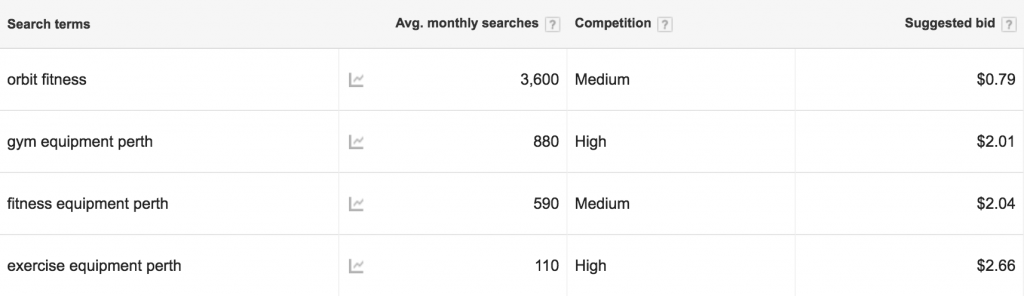
Just check out how many searches Orbit Fitness have for their brand name. It dwarfs some of the biggest geo-tagged fitness equipment related keywords.

A lot of the time, the people behind these searches are hot, ready to buy customers who aren’t particularly loyal to the company that they’re searching for.

Think of it like how some people will still say that they will “Hoover” the floors (with their Dyson).

If you’re able to present a better deal or a competitive advantage over the business that you’re targeting, you can pull a lot of opportunity your way.

So, competitors’ brand names can be a valuable source for additional traffic, leads and sales. Especially if you’re not currently hitting your daily budget in AdWords.

However, when done wrong, it can waste your budget at best, and land you in some really hot (even legal) water at worst.

Don’t Use Other Brand Names In Ads

Target your competitors’ brand names as keywords, for sure.

But don’t actually write ads where you write their brand name in.

Never. Ever.

Firstly, in your own interest, you’re just going to fool search users who are just going to bounce straight off your website, running up your daily budget with very little return.

Secondly, it’s a real d*ck move. It’s not going to help you get on with everyone in your industry.

Thirdly, there’s always the potential of legal action.

Just steer clear of that “strategy” all together.

Don’t Use Dynamic Keyword Insertions

So (hopefully) you know not to use your competitors’ brand names in your AdWords ads.

But you could end up displaying a competitor’s name in your ad without meaning to.

Despite how sh*t they are, some people are still using Dynamic Keyword Insertions (DKI) in their ads.

(Okay, DKI has it’s place in some large e-Commerce websites. But for most businesses, it’s a lazy way to try to provide relevancy in their ads).

If you don’t know how DKI works, basically, when you’re writing your ads you can use the {Keyword:Example} command.

As long as the Search Term that a search users looks for (and matches with your ad) fits the character limit of your ad, the “Example” part will be replaced with the Search Term.

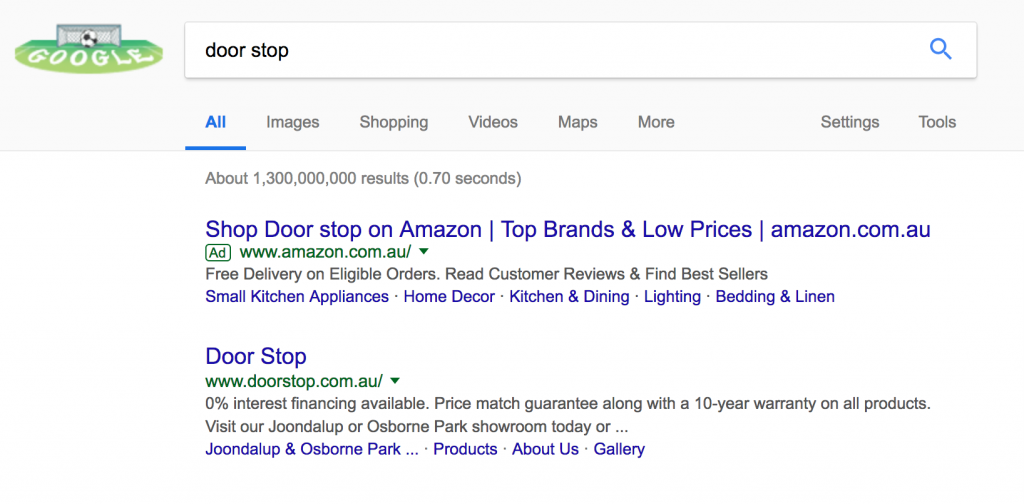
In the best case scenario, your ads will look pretty stupid like in this example below from Amazon, who would have written their Headline 1 like this:

“Shop {Keyword:Products} on Amazon”

The {Keyword:Prodcuts} has been replaced by my search term “door stop”, changing the Healine 1 to read:

“Shop Door stop on Amazon”

So you can see how in the worst scenario, one of your broad match keywords could end up matches with a competitor’s brand name.

And the Dynamic Keyword Insertion feature kicks in, displaying that competitor’s brand name loud and proud in your in your ad.

(Whilst I did manage to find an example of doing this, I thought it was best not to show the example and avoid calling someone’s business out).

Setting It Up Right

It’s always ideal to have a seperate Campaign for targeting your competitors.

Firstly, you can use your competitors’ brand names as negative keywords in your other campaigns so that they aren’t indirectly bidding on those terms through broad match keywords.

Then, in your Competitors Campaign, I would have a dedicated AdGroup for each competitor that you plan to target – making it easier to identify which competitor’s keywords are actually working for you.

Having a seperate budget for your Competitors Campaign is also a good way to ensure that your other Campaigns’ budget isn’t chewed up by this new one.

Writing Good Ads

Ensure you’re writing ads that boast a competitive advantage which your targeted competitor doesn’t have.

It’s also a good idea to ensure that your brand name (not your competitor’s) is very obviously stated in the ad copy.

Because if you don’t do that, the only identifier you have for your business is your URL (which a lot of people don’t always glance at).

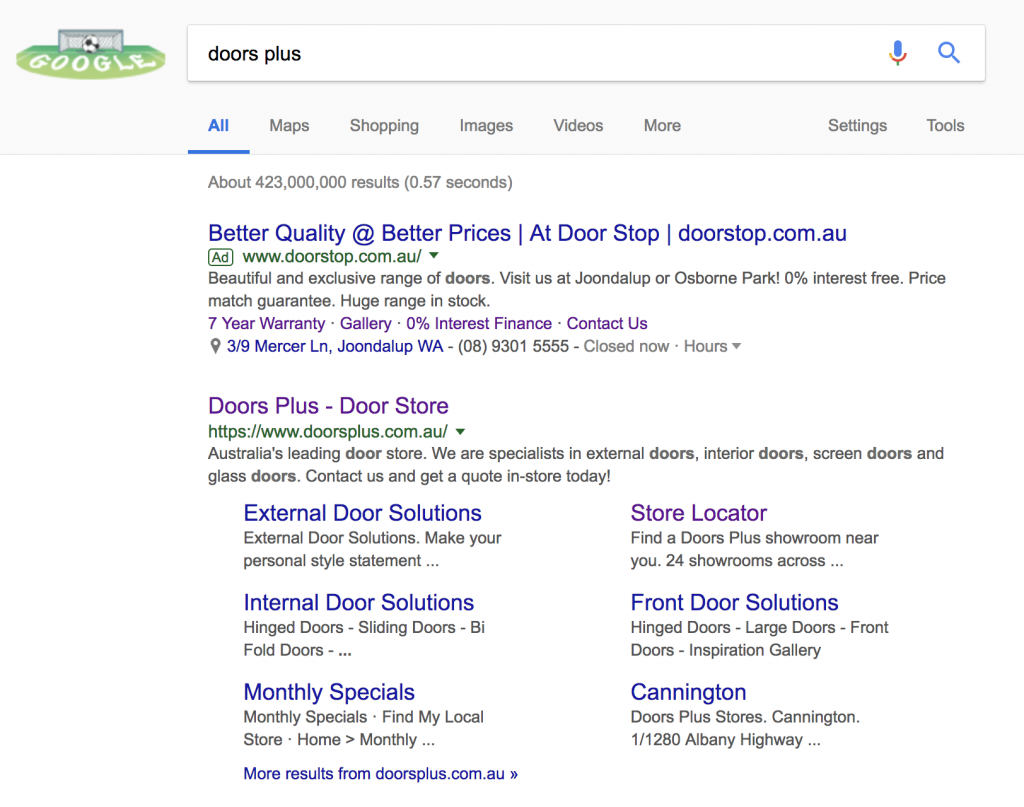
A good example of an ad that is designed to be used with competitor’s brand names (without tricking or confusing anyone) is this one with Door Stop:

Door Stop haven’t mentioned their competitor’s name in the ad.

And whilst the word “better” is used, it requires the search user to put two and two together, and doesn’t explicitly state who their quality and prices are better than.

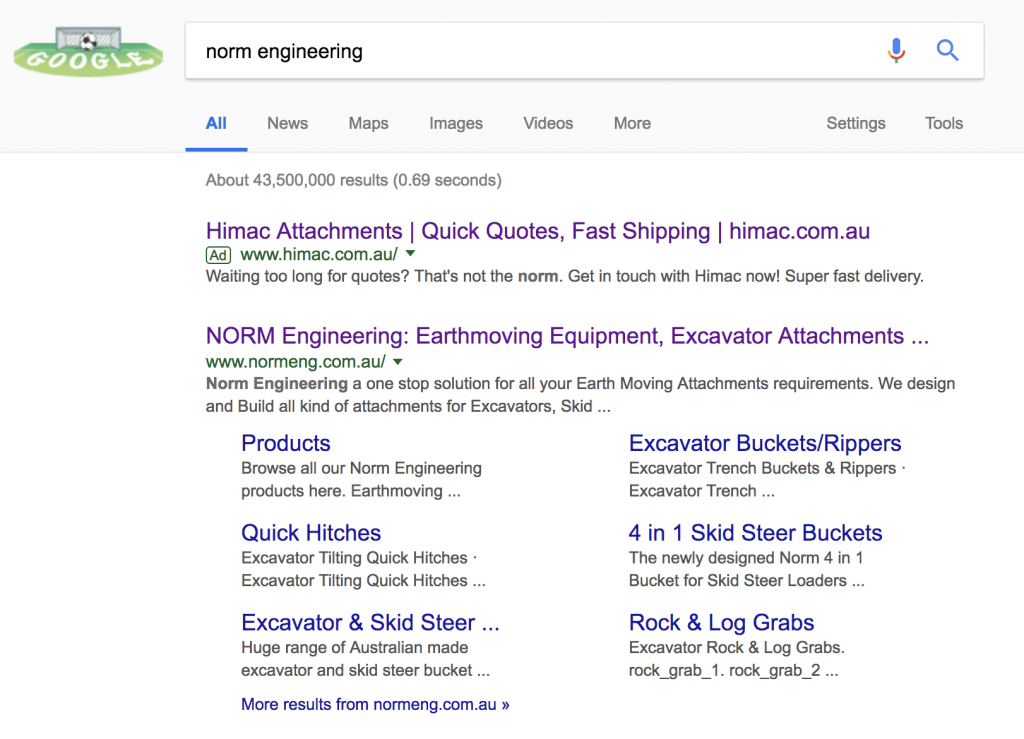
There’s also the opportunity to be a bit cheeky if the competitor’s brand name can be used naturally in a sentence, like Himac Attachments in this example:

This one just about gets away with murder here as luckily this competitor’s name can be used naturally. The fact that the word “norm” wasn’t capitalised also helps.

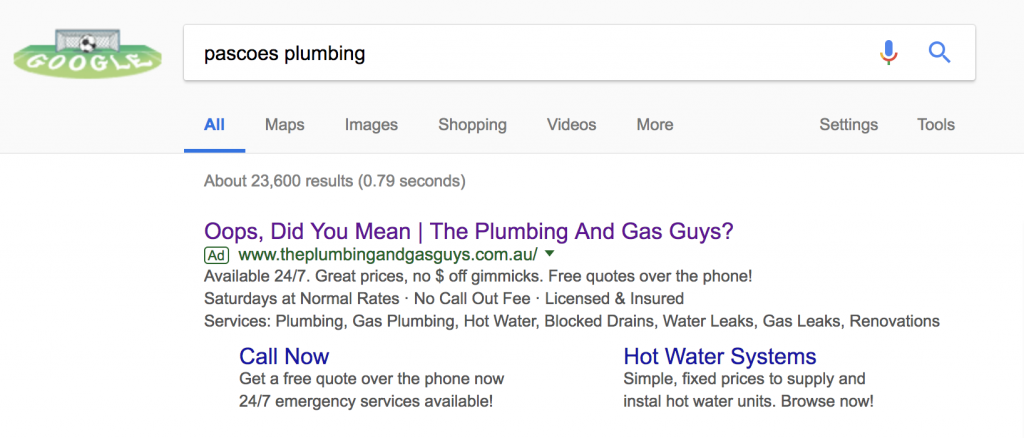
If you want to have a bit of fun but don’t have the chance to perform some word play on your competitor’s brand name, you can try something like what The Plumbing And Gas Guys did:

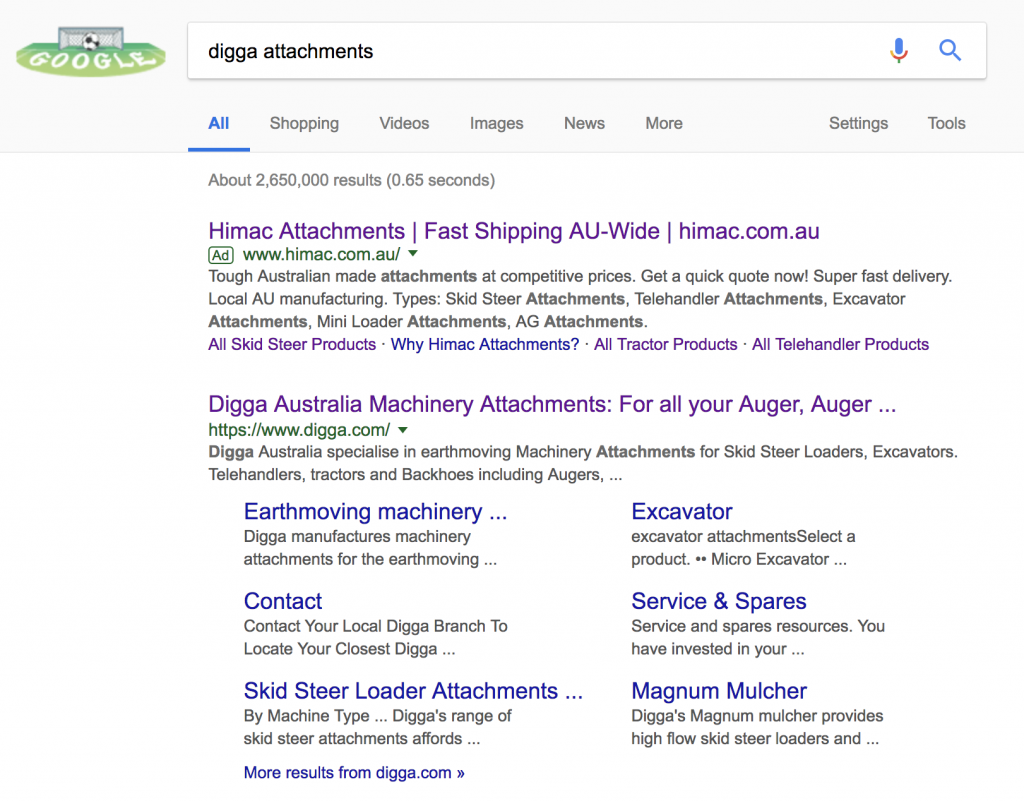
Or if you just want to play it safe, use an ad that you would typically use when bidding on your own brand name like so:

Monitor Performance

Always ensure that you’re tracking conversions with your AdWords campaigns – such as phone calls and enquiry forms filled.

Monitor your Competitors Campaign and its AdGroups closely and ensure that you’re pulling in leads at a reasonable cost.

If things are starting to look expensive, try lower your bidsrevise your ads to be more clear and/or look through the Search Terms report to see if there’s any keywords that are causing waste.

If, for whatever reason, you’re not seeing results from bidding on a particular competitor’s brand name – you may have to pause the AdGroup.

Don’t forget to segment data by device types when analysing, too.

Because there’s a chance that people searching on a mobile are looking for an address or phone number rather than researching.

So, you may get poorer results on mobile.

Or you may not.

That’s the beauty of AdWords.

Every Account is different so you’ll just have to see for yourself.

How to stop competitors clicking on your Google Ads

Click fraud is when your competitors think that they’re somehow improving their business by sh*tting on yours by continually clicking on your AdWords ads, eating up your daily budget and depriving you of the opportunity to garner genuine search users.

And I hate it.

If you’re afraid of competition, you shouldn’t be in business.

Clicking on your competitors’ adverts and running up their account doesn’t make you clever, it makes you an a**hole.

Now, Google is said to have the best click fraud detection software built into the AdWords platform and will void or refund any detected click abuse.

The problem is, that’s not always the case.

Not even close.

Competitors Running Up AdWords Budget

Unfortunately, it happens. Quite often too.

I’d like to share with you a story about a carpet cleaning client who seemed to have a target on his back in the eyes of at least one of his competitors.

This carpet cleaner came to me after having his AdWords campaign run by Google, by an overseas provider and was getting absurd monthly management quotes from local AdWords agencies.

Still wanting local expertise but not wanting to pay through the nose, he went searching for AdWords freelancers and found me.

Straight off the bat, things were going superbly with 5 jobs booked on the first day, he couldn’t have been happier.

The campaign continued to improve week after week.

Until about a month ago…

Things just dried up.

Click Fraud Software Was Installed

After doing some research and seeing compelling arguments for click fraud software, I started a free trial of ClickCease.

From the very first day, we got a bite.

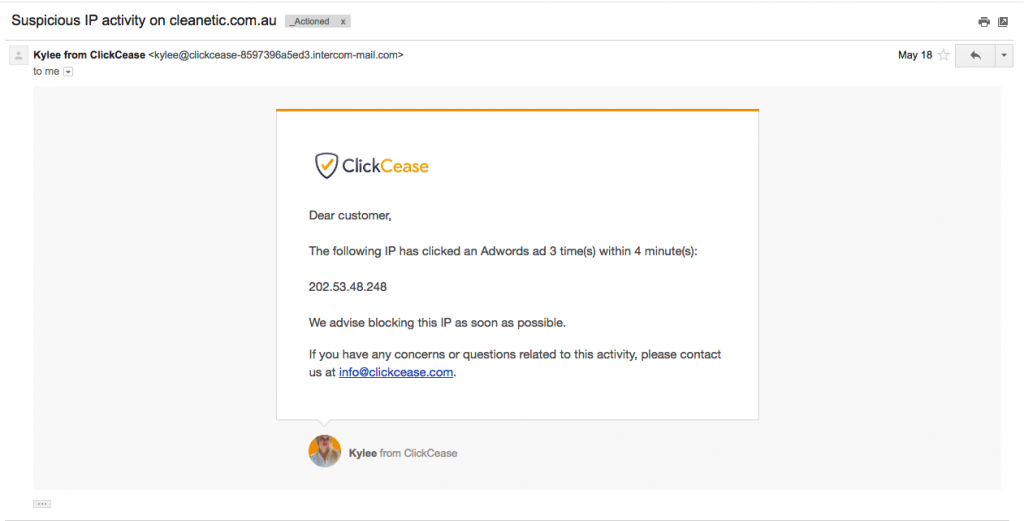
3 times within 4 minutes from the same IP? How did Google allow that to slip through?

I immediately went to check the AdWords panel. Yep, 3 clicks, and we were being charged for them as well. AdWords did not pick these clicks up as “Invalid Clicks”.

I figure that no system is perfect and this was just a once off, right?

Nope.

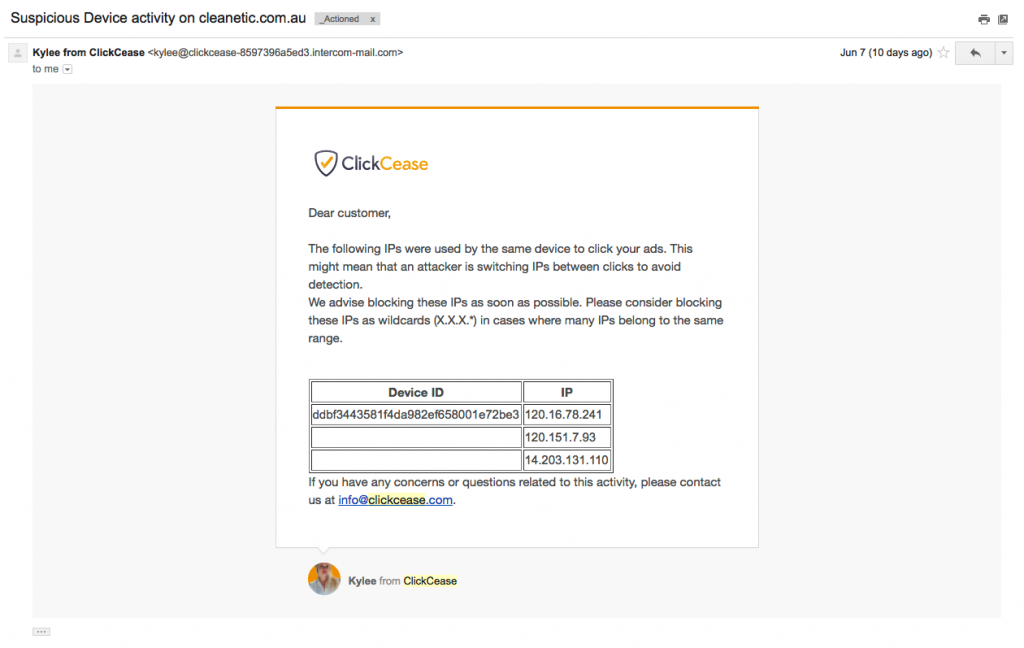
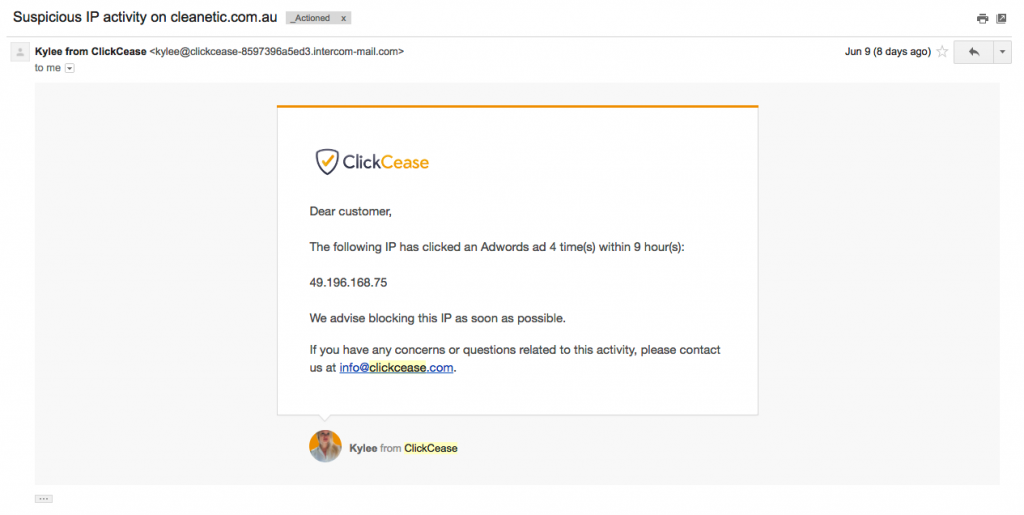
Almost every single day for at least a week I was adding a new IP to the list.

Whoever was doing this to my client was persistent as well, going to great efforts to ensure they caused as much harm as possible.

And trying to click less aggressively throughout the day as to not raise any flags.

I have to say, I was really pleased and impressed that this software was able to pick up on these varying tactics and isn’t so easily outsmarted.

I can understand why many people think that click fraud detection software isn’t necessary inbuilt Google’s in-built system is the best way of combating competitors clicking on your AdWords ads.

Because I know how much click fraud can slip through undetected, I’ve since installed ClickCease on most of my AdWords accounts and I’ve hardly ever needed to block any IPs.

How Are Things Now?

Now that we’ve managed to block so many IPs, we’re really hoping that my client’s competitor has better things to do in his/her time than find ways to click on our ads.

(Better things like…focusing on their own business?)

Things are back to the way that they were, with a healthy amount of calls and e-mail enquiries each day from our AdWords spend.

We’re still picking up some new IPs here and there, but they are few and far between and it’s not destroying the campaign and causing my client to bleed financially like before.

The frustrating thing is that everyone has access to at least a few IP addresses and you may need to block the following person’s avenues such as:

  • Their home internet connection
  • Work internet connection
  • The internet connection through their phone service
  • Their partner’s phone service
  • Siblings or friends phone service
  • Public WiFi’s such as a shopping centre, restaurant or a hotel lobby

How Do You Block Competitors IPs In AdWords?

Very easily.

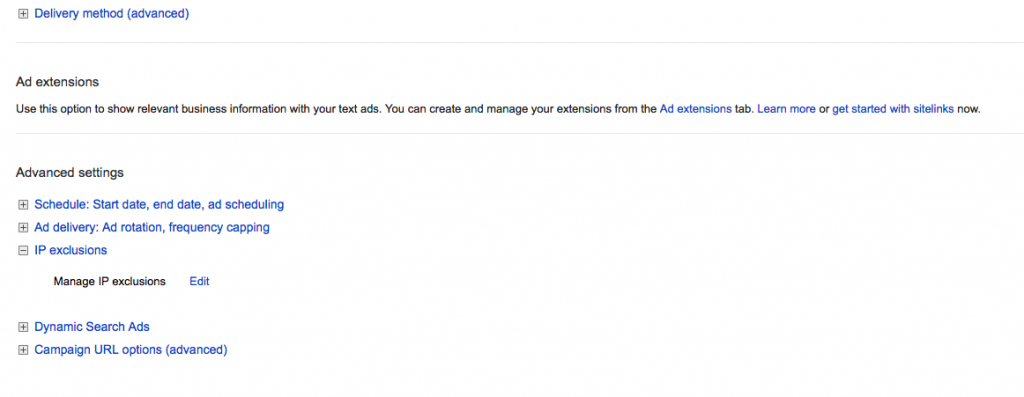
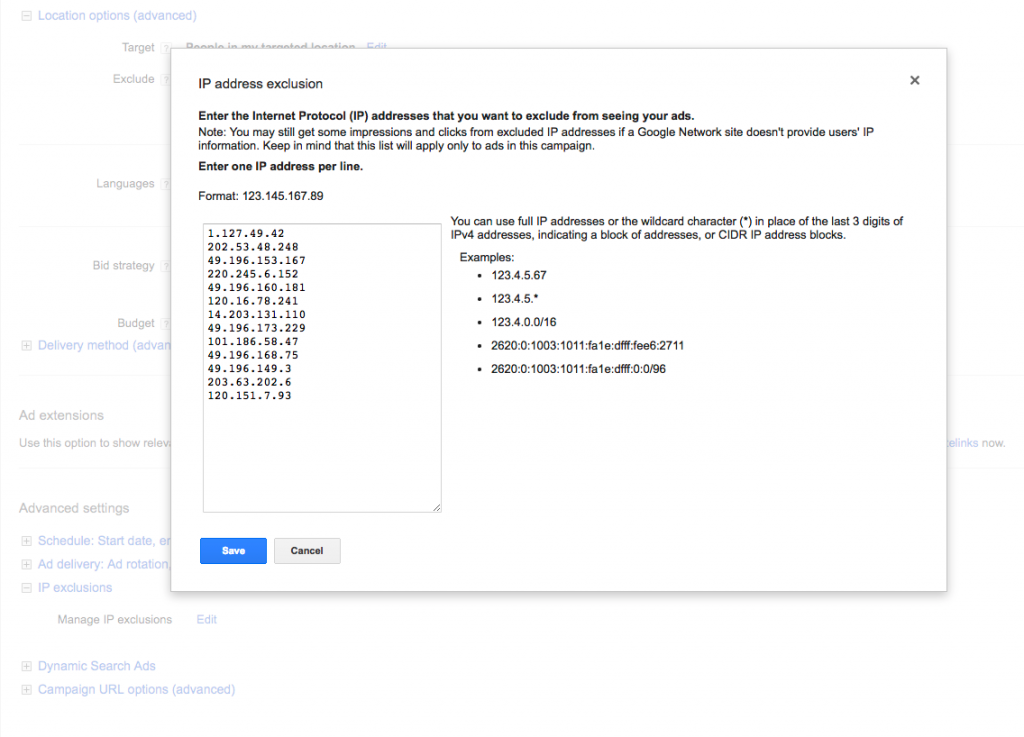
Go into your AdWords account and click on a Campaign.

Once inside your AdWords Campaign, click on the Settings tab at the top.

Scroll down to the bottom of the page and underneath Advance Settings, you’ll see a drop-down title called IP Exclusions.

Simply enter/copy and paste the IP addresses that you want to block in the text field.

If you have more than one Campaign, you will have to repeat this step in every Campaign to completely block out that IP address.

How Do I Find Out Whose IPs These Are?

You can’t.

It’s a privacy issue and that information is held by Internet Service Providers (ISPs) such as Telstra, Vodafone, iiNet, iPrimus and Optus.

You would need to start legal proceedings and obtain a court order to demand an ISP to hand that information over.

Remember the whole illegal downloading row over Dallas Buyers Club?

The makers of Dallas Buyers Club entered a lengthy legal battle with Australian ISPs to uncover the 4,726 IP addresses the German-based firm Maverick Eye detected who were sharing the movie through peer to peer software such as BitTorrent, uTorrent, etc.

Realistically speaking, if a major production house is not able to uncover those IP addresses, you’re not going to uncover them due to someone clicking on your AdWords ads too many times.

The best thing you can do is to invest in click fraud software to detect and block IPs when competitors are clicking on your AdWords ads.

Do I Need Click Fraud Software?

Click fraud software is not the only way to find out if there has been click abuse through your AdWords ads.

You are able to access your web logs through your server. In cPanel, for example, the web logs are often referred to as Raw Access/Raw Access Logs and can be downloaded for inspection.

Although, this requires you periodically downloading the logs and manually checking if there are any IP addresses that are continually hitting your site through AdWords.

I’m sure most people don’t have time to do something like that. Plus, the longer between your periodic checks, the more likely it is that you’re pouring money out thanks to your competitors.

For something like US$15p/m, it’s a very small investment that easily pays itself off even if you have infrequent click abuse.

Even if you don’t suspect that competitors are clicking on your ads, its a good idea to have it running for peace of mind as when a competitor does decide to get aggressive with your ads (and Google is letting it slide right by), it chews through your budget awfully fast.

Please note that this article was not sponsored, paid for, nor do I have any arrangement or partnership with ClickCease. They just happened to be the click fraud software I selected based on third party reviews and features.